The Gadget shutdown field manual

124

Days until every Gadget app stops running

Your Gadget app has an end date. Your store should not.

Gadget announced its wind-down on November 9, 2026, and the platform goes dark on March 31, 2027. Your app is already built for Shopify, so it can be moved as it is, with a zero-downtime cutover, and does not have to be rebuilt from scratch. This page is the working manual for the move: the dates, what actually moves, what has to be replaced, the cutover runbook from our head of development, and three checks any merchant can run today.

Announced Nov 9, 2026 13% of the runway used Dark Mar 31, 2027
  1. Gadget · Nov 9 Wind-down announced. No new apps can be started.
  2. Gadget · Nov 30 Last first-time production deploys.
  3. Gadget · Dec 31 Support ends. Critical issues only from here.
  4. Shopify · Jan 1 Public apps on non-expiring tokens are delisted and flagged.
  5. Gadget · Mar 31 Platform shuts down. Every hosted app stops.
  6. Shopify · Apr 1 Public apps missing either security control lose Admin API access.

Sources: Gadget wind-down notice · Shopify developer changelog · Gadget's migration guides are promised without a date

Who built the app decides your next move.

Your engineers know the app, and the code can move as it is.

An in-house build is the best case, because the code is TypeScript that your team can export and host elsewhere, with some Gadget-specific functionality to replace. The part that deserves a second set of hands is the live data sync and the switch, where a mistake shows up as missing orders. We run the migration alongside your team, or we review their cutover plan before they commit to it.

This week

  • List what the app does in one page
  • Decide who owns the data sync and the cutover
  • Read the runbook below

The app stays in Shopify. The server behind it moves.

A Gadget app is already a fully functional application, written in TypeScript and built specifically for Shopify, so its existing functionality does not have to be rebuilt from scratch. It needs a new home, replacements for what only Gadget provides, and a handover that your store never notices.

Stays where it is

  • The app and its listing
  • Every store's install
  • Checkout blocks
  • Discount, shipping and payment rules

These belong to your Shopify developer account and run in Shopify. No store reinstalls the app, no checkout block is placed again, and no rule is recreated.

Moves to a host you control

  • The server
  • The database
  • The app's admin screens

This is the part Gadget hosts, and it is what moves. The real challenge is keeping the data consistent throughout, replacing the services that only Gadget provides, and switching over with zero downtime.

Layer What happens to it
The database
Moves as it is, with nothing changed.
The backend logic
The server code moves to the new host with its business logic unchanged, and the Gadget-specific functionality it relies on is replaced. Shopify Functions are already deployed to Shopify and need no copy.
The Shopify connection
The existing app is updated, using the new expiring tokens and an IP allowlist.
Scheduled and background jobs
They move to a standard job queue on the new backend. At the switch Gadget's webhooks are disabled and ours are activated, and the database sync keeps running until every pending job on Gadget has finished, so no data is lost.
The interface
Extensions are already deployed to Shopify and need no copy. Blocks and links that talk to the Gadget server are rebuilt to talk to the new one, and the admin screens move with the server.
Data migration
An initial database copy, continuous synchronization, and a live cutover using a zero-downtime approach.

Eight things Gadget did for the app. Each one gets a replacement.

The code moves, but Gadget also provided the services around it. These are the built-in features we replace or reimplement during the migration, which is why the move is engineering work and not a file copy.

Gadget provides What replaces it
Auto-generated APIs and access control Gadget generates the app's APIs and handles who can call them.
Our own API layer, with authentication, authorization and the Shopify integration built in.
Model Actions Gadget's own system for running the app's business logic.
The same actions, adapted to the architecture of the new backend.
Background jobs and queues Scheduled tasks, background jobs and queue processing.
A standard job queue, such as BullMQ for Node.js.
Environments Separate development and production environments.
Equivalent environments, set up and maintained by us.
Database The hosted database behind the app.
PostgreSQL, deployed and configured as part of the infrastructure setup.
AI integrations Built-in connections to OpenAI and other LLM providers.
Direct API integrations or the providers' own SDKs, where the app uses them.
Computed fields Gadget's own query and expression mechanisms.
The same logic, reimplemented, where the app uses it.
File storage Gadget's own storage for the app's files.
An alternative storage service.

A copy is not enough, because the app never stops.

A copy is a snapshot. While it is being made the app is still running on Gadget, processing webhooks and serving users, so the data keeps changing. A zero-downtime move needs the snapshot and a sync that does not stop until the switch.

  1. Step 1

    An initial snapshot

    We export the database from Gadget and import it into the new one.

  2. Step 2

    Continuous synchronization

    Every change made in Gadget is carried into the new database for the whole of the migration. PostgreSQL's built-in mechanisms do this where Gadget allows access to them, and Gadget's APIs do it where it does not.

  3. Step 3

    The switch

    The new database is always up to date, so the app moves to the new backend without losing data and without an interruption.

The runbook, from the engineer who runs the migration.

Written by Konstantin Barahskov, who leads Development at MTN Haus. The real work is keeping the data consistent and making the switch without a gap, and this is the sequence, in the order it runs.

Weeks before

Prepare everything, switch nothing.

  1. A new backend on a host you control, with an IP allowlist and expiring access tokens from day one, which are the two things Shopify now requires anyway.
  2. A copy of the database, plus a live one-way sync from Gadget into it. The app keeps running on Gadget and the new database keeps up, so on switch day there is nothing left to copy.
  3. Each store's access to the app moved over with the data, so background work such as order sync keeps running without asking merchants to open the app again.
  4. Checkout blocks, theme blocks and storefront links that talk to the Gadget server rebuilt to talk to the new one, and held back for the release.
  5. A new app version prepared but not released, carrying the new app address, the new webhook address and the rebuilt blocks. Releasing it is the whole switch, and rolling back starts with selecting the previous version.
  6. Logging and alerts on the new backend before anything is switched, on the server and in the browser for the checkout blocks and app screens.
  7. A rollback path, built and tested before the switch: the mechanism that re-registers the original webhooks, and the same sync prepared to run in the other direction, from the new database back into Gadget.
  8. A full rehearsal on a development store, switch and rollback both, timed, with our QA team testing the app end to end.
Switch day

About 15 minutes, in a quiet hour.

Fifteen minutes is our planning figure for an app on a single store. The timed rehearsal replaces it with the real number for yours, and an app with long-running jobs or many installs takes longer, because Gadget is left to finish what it started.

  1. Release the prepared app version, with Gadget's webhooks disabled and ours activated in the same step. App screens, webhooks and checkout blocks move to the new backend at the same moment, in every store.
  2. Let Gadget finish what it already started. Webhooks in flight and jobs already running complete on the old server, and the sync carries their results into the new database. Gadget starts no new scheduled runs, and the new backend takes the schedule from the next one.
  3. Wait until Gadget is idle and the database sync has caught up, then switch the sync off. Nothing was stopped halfway, so there is no gap to fill.
  4. Place a test order end to end, open the app in the admin, and check that webhooks arrive.

The order matters. Stopping jobs first and releasing after opens exactly the window where nothing runs. Releasing first and letting the old server finish leaves no window at all.

The first days

See everything, and test what logs cannot see.

A migration without monitoring is a migration you find out about from a customer. On the backend we log every relevant event and API request, and any error while a request is being processed raises an alert. In the app's screens and in our extensions we capture JavaScript errors as they happen in the browser, so a checkout block that fails to load or a webhook that was not processed is known to us straight away, while it is still one order and not a hundred.

Errors are not the only way a migration goes wrong. Some operations fail silently, without throwing anything, and a discount that quietly did not apply raises no alert at all. That is why our QA team tests the app thoroughly before the switch and again after it, and why we never treat logging and monitoring as enough on their own.

If something goes wrong

Rolling back takes five to ten minutes.

Rolling back is releasing the previous app version and re-registering the original webhooks, which points everything at Gadget again within five to ten minutes. The sync prepared for this then runs in the other direction and carries back what the new backend recorded in between, so nothing entered after the switch is lost. Gadget stays on standby for a week or two, and only then is it switched off and its keys revoked.

Optional

Changing more than the host?

The migration changes one thing, which is where the app runs. Rewriting an app that already works would add cost without adding anything your store would notice, so we do not propose one. The better use of the moment is to bring the app up to date while it is open: updating the billing implementation, upgrading extensions to their latest supported versions, and aligning the rest of the app with Shopify's latest requirements and best practices. Expiring access tokens and the IP allowlist are already part of the move.

Choosing Gadget was not a mistake. Leaving your apps unwatched would be.

Managed platforms earn their place. Gadget saved its customers the infrastructure, DevOps and maintenance work that a smaller app cannot justify, and nothing else on the market is built quite like it. The trade-off is that a provider can change direction, and the protection is a technical team that is responsible for the app: one that monitors every platform update, weighs the risk early, and can prepare and run a migration when it becomes necessary.

  • Who is responsible for this app today?
  • Who is watching the platforms it depends on?
  • How quickly could it be moved if it had to be?

Three checks any merchant can run today.

Do your apps meet Shopify's security requirements?

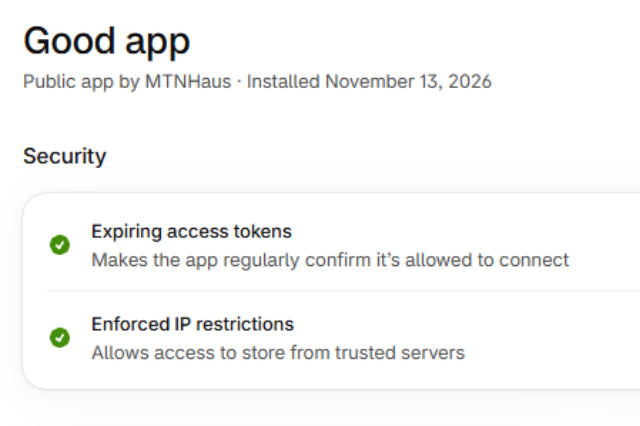
Shopify lets merchants review the key security measures of each installed app from the admin.

The Security section of an app in the Shopify admin, showing Expiring access tokens and Enforced IP restrictions with green checks
Where to look
  1. Open your Shopify admin.
  2. Go to Settings, then Apps.
  3. Select an installed app.
  4. Scroll down to the Security section.
  5. Find Expiring access tokens and Enforced IP restrictions.
What a problem looks like

A green check means the measure is configured. Missing means the developer has not set it up, and Unknown means Shopify cannot confirm its status or the measure is not active for your store. If either check that applies is marked Missing, the app may need an update to meet Shopify's requirements.

What to do

Ask the app's developer whether they plan to add the missing measure. For a custom app, have your development team review its authentication and API access configuration. A missing measure does not mean the app is unsafe today, but it should be investigated.

Are there deprecation or compatibility warnings on your own apps?

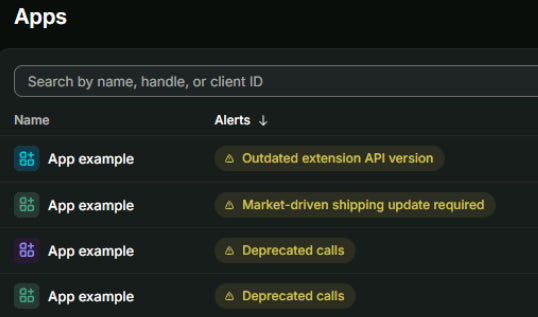
Shopify gives developers built-in alerts that flag outdated integrations before they cause problems.

The Apps list in the Shopify Dev Dashboard, with an Alerts column showing warnings such as Outdated extension API version and Deprecated calls
Where to look
  1. Open the Shopify Dev Dashboard.
  2. Go to Apps.
  3. Check the Alerts column for warnings.
  4. Select an app to open its Overview page.
  5. Review the alerts and their recommended actions.
What a problem looks like
  • Deprecated API calls: the app uses functionality scheduled for removal.
  • Outdated extension API version: an extension uses an unsupported version.
  • Deprecated offline token: the app still uses non-expiring offline access tokens.
  • Webhook failures: Shopify cannot deliver the app's webhooks.
  • Function errors: Shopify Functions are failing as they run.
What to do

Review the affected integrations, identify the changes needed, and prioritize them by severity and deadline. If a freelancer or an outside agency built the app, ask the original developer to address the warnings or arrange an independent technical review. Check regularly, because an app that works today may still need updates as Shopify's platform changes.

Is the legacy REST Admin API still in use?

Shopify classified the REST Admin API as legacy in October 2024, and new public apps have had to use the GraphQL Admin API since April 2025. Existing apps may still rely on REST.

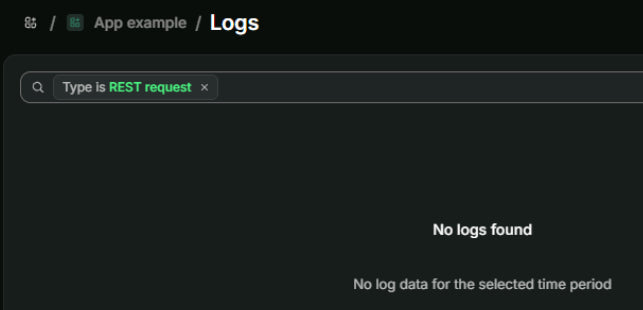
The Logs page of an app in the Shopify Dev Dashboard, filtered by Type is REST request, with no logs found
Where to look, if you own or develop the app
  1. Open the Shopify Dev Dashboard.
  2. Go to Apps and select the app.
  3. Open Logs.
  4. Filter the logs by Type, then REST request.
  5. Review the requests and the API versions they use. Filter by GraphQL request to compare the two.
What a problem looks like

REST requests in the logs confirm that the app still uses the legacy API. That does not mean the app is broken, but it is a sign that the app is due for modernization. Look closely at deprecated endpoints, unsupported API versions and related warnings.

What to do

Ask your development team to identify the remaining REST integrations and plan their move to GraphQL. For a third-party app, where you cannot see its Dev Dashboard, ask the developer whether the app still relies on REST and whether updates are planned.

Gadget is one deadline. Shopify has set five more.

Platform shutdowns are rare, and the two others on this calendar, Zeabur and Deno Deploy, host few Shopify apps. The dates that reach most stores are Shopify's own. Every public app that calls the Admin API now needs an IP allowlist and expiring access tokens, and a custom app that an agency or outside developer owns and installed on your store needs the allowlist too.

Date What changes Who it reaches
Nov 12, 2026 Shopify · in force
Bulk operations are blocked for public apps without an IP allowlist.
Public apps that run bulk imports or exports.
Nov 20, 2026 Shopify
Public apps without an allowlist are delisted, closed to new installs and flagged in Settings, under Apps. Custom apps installed on stores outside the organization that owns them need an allowlist before any new install.
Public apps, and custom apps owned by an agency or outside developer.
Dec 31, 2026 Zeabur
The hosting platform shuts down, and services on its shared clusters are paused from December 1.
Apps whose server runs on Zeabur.
Jan 1, 2027 Shopify
Public apps still on non-expiring tokens are delisted and closed to new installs. Custom apps installed outside their owner's organization need the allowlist for existing installs as well.
Public apps, and custom apps owned by an agency or outside developer.
Jan 15, 2027 Shopify
Merchants see a warning in the admin for each public app still missing either control.
Every store that runs one.
Mar 31, 2027 Gadget
The platform shuts down and every hosted app stops.
Every app on Gadget.
Apr 1, 2027 Shopify
Admin API requests fail for public apps missing either control.
Public apps that have not made the change.
April 2027 Deno Deploy
The service shuts down six months after its October 9 notice.
Apps whose server runs on Deno Deploy.

Where an app on Gadget stands

An app on Gadget can meet both controls today. Gadget moves each store to expiring tokens on its own once the Shopify connection is on API version 2026-04 or later. The allowlist is set by hand in the Dev Dashboard, and because Gadget's calls to Shopify come from changing addresses, its guide has the developer enter Google Cloud's United States network, which every Google Cloud customer shares. On a host you control the allowlist names your own server addresses, which is the narrowest form Shopify offers.

Not sure where your apps stand against these dates? That is what the audit is for.

see the exposure audit

Weeks of preparation. Minutes of switching.

Most of the calendar goes to preparing and rehearsing while the app keeps running on Gadget. The switch itself is short, and Gadget stays on standby behind it until we are sure.

  1. Now · 48 hours

    Inventory

    The exposure audit, read-only, with the Gadget app mapped alongside every other app and integration on your Admin API.

  2. Weeks before

    Prepare

    A new backend, an initial database copy with continuous synchronization, a prepared app version, a tested rollback path and a timed rehearsal with our QA team. Nothing is switched.

  3. About 15 minutes

    Switch

    The prepared version is released in a quiet hour, Gadget finishes what it started, and a test order confirms the result.

  4. The first days

    Watch

    Errors on the server and in the browser raise alerts, our QA team tests the live app, and a rollback of five to ten minutes stays available.

  5. A week or two later

    Retire Gadget

    Gadget is switched off and its keys are revoked, well ahead of March 31.

The earlier the preparation starts, the more of it happens while Gadget still offers support, which ends on December 31.

Why MTN

Your app is already built for Shopify. Our job is to move the part behind it without your store noticing, and then to keep watching Shopify's changes so that it stays compliant.

  • Shopify Platinum Partner
  • The engineers who plan the cutover are the ones who run it
  • A dedicated QA team that tests before and after the move
  • Monitoring and alerts from the first minute
  • LMNT, Bandit Running, Leupold Optics, Hammer Nutrition, Skatepark of Tampa, Garage Beer, Powder Mountain

Start with the inventory.

The migration review runs as part of the Shopify exposure audit, so one engagement tells you what the Gadget app does and what else on the store is exposed to Shopify's deadlines.

  • $2,500 flat per store
  • Read-only
  • Findings in 48 hours
  • Reply in one business day
Who built the Gadget app

We reply within one business day. You can also write to [email protected], call 720.230.6669 or request the audit on mtnhaus.co.